 Pace


Who was at fault? Look at both drivers' telemetry.
Every contact between two cars in your F1 25 league race becomes an incident: 12 seconds of both drivers' steering, throttle, brake, speed and position, side by side, with a top-down view to scale. One person in the lobby runs Pacedex — the other drivers install nothing. And while the race is on, Race Control puts every contact, track-limit warning and penalty on one live screen — for stewards at home too.
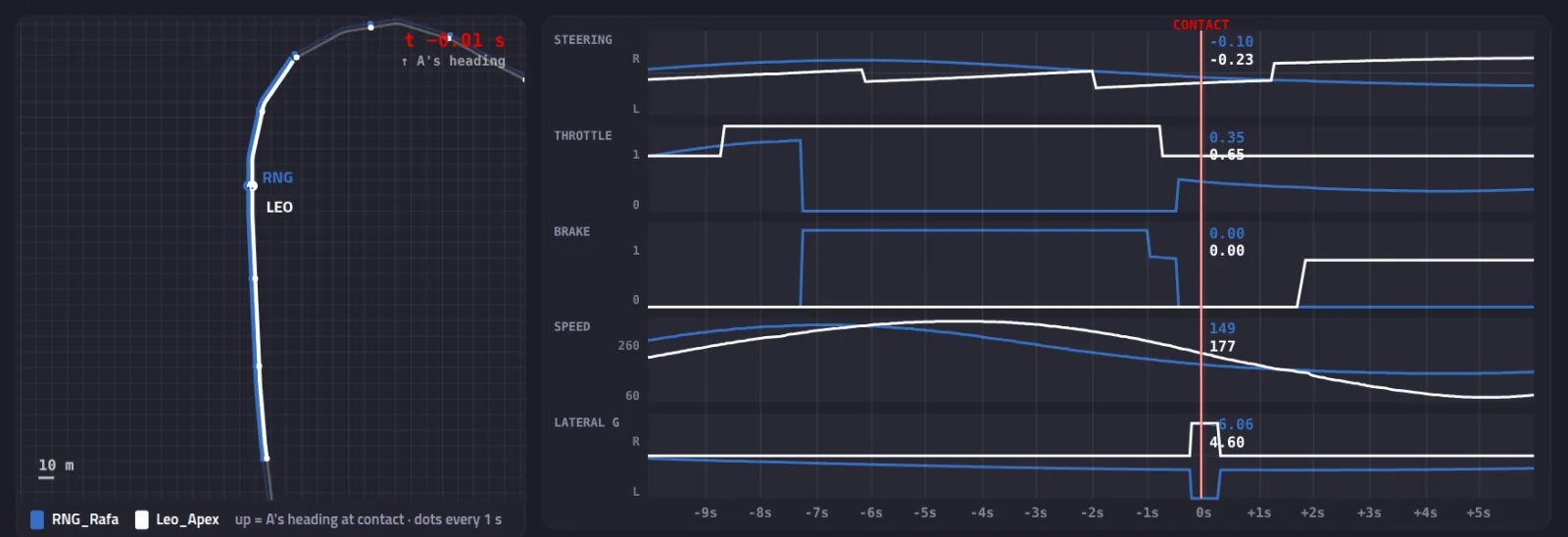 A real incident page — open the live example → (from the built-in simulator)
Facts measured by the game — the verdict stays with the league.
Who needs what
The steward (or commentator)
Joins the lobby — as a spectator is fine — with the game's UDP telemetry on. Pacedex captures all 22 cars; every contact the game reports is saved automatically, and a hotkey marks anything else by hand.
The drivers
Only one game setting matters: Settings → Telemetry → Your Telemetry = Public. For a driver on Restricted the game sends position and speed but zeros for steering and pedals — Pacedex flags them as restricted rather than showing empty inputs.
The league
The steward hits “Share link”: a public page like the one above, plus a picture for the group chat. Nothing leaves the PC until they click; the link can be revoked.
What the incident shows
Both cars as 5.6 × 2.0 m rectangles, rotated to car A's heading at the moment of contact, with a 10 m grid and a dot every second — was he alongside or not?
Four synced strips for both drivers, −8 s to +4 s around the contact. Drag the cursor, step frame by frame, or press play in real time.
Overlap at contact (how far alongside, ahead or behind), who braked or lifted first and when, which way each wheel turned in the last half second, minimum distance.
The game reports every collision with both car indices — those are saved on their own. For anything else there is a “Mark incident now” button and a global hotkey.
If a driver kept the game's telemetry on Restricted, the page says so instead of drawing a driver who “did nothing”. Position and speed still show.
Incidents live in your local database. Sharing is one click per incident, with a public page and a picture; revoke any time.
Race Control: the whole race on one screen
The incident page is for the contact you are judging. Race Control is for the race you are watching: every track-limit warning, contact, penalty, overtake and retirement, live, on a map of the circuit and in one feed. In the app it's under Competition → Race Control.
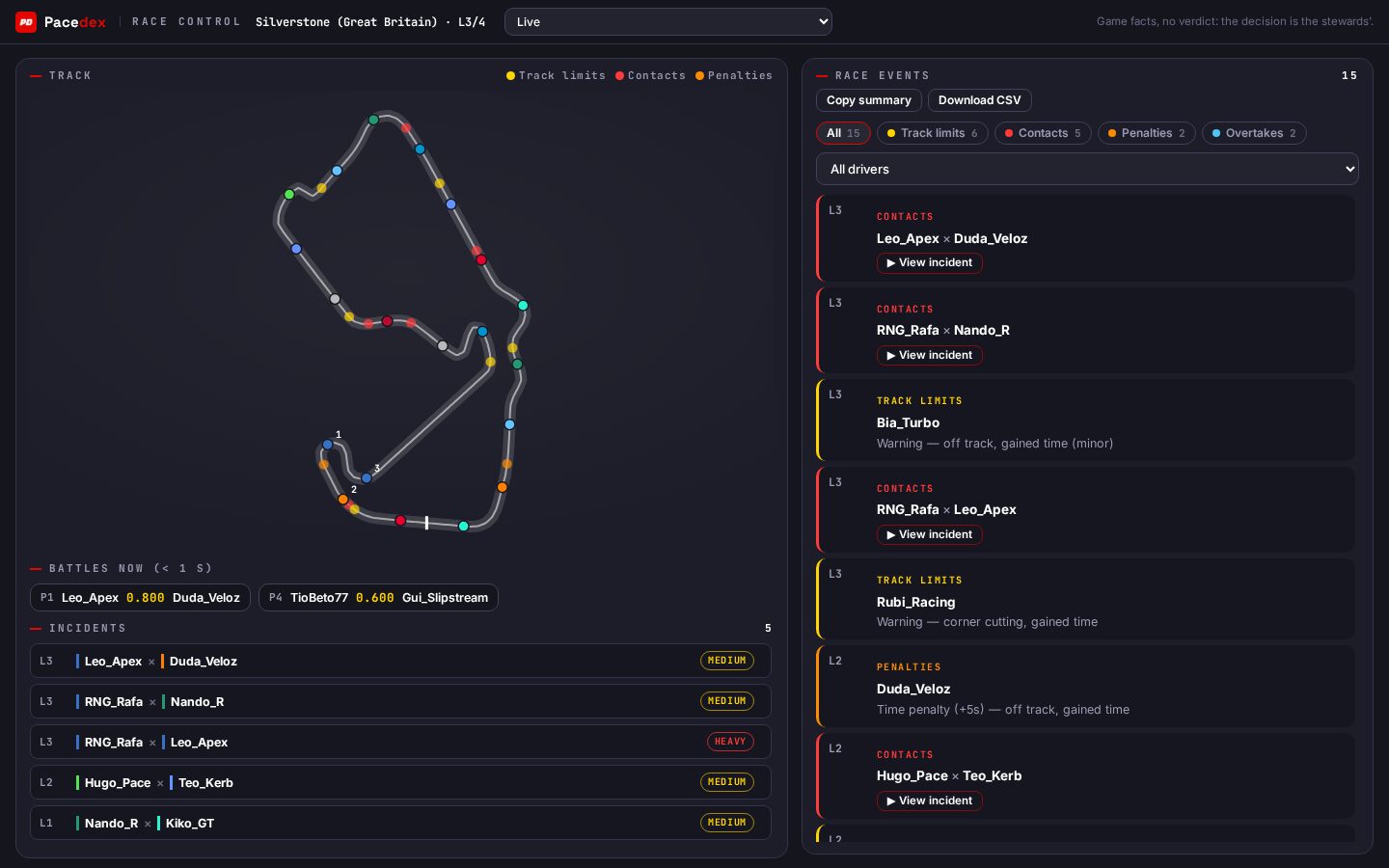 Race Control mid-race (from the built-in simulator)
Each warning, contact and penalty is a mark on the track map, at the exact point of the lap. Five track-limit strikes in the same corner jump out at a glance.
Track limits, contacts, penalties, warnings, overtakes, retirements and served penalties, each with lap and drivers. Filter by type or by driver.
Who is within a second of whom right now — the places where the next incident is most likely to come from.
Position, interval, track limits, warnings, penalties and contacts for every car. The driver on their fourth warning is right there in the row.
The session's incidents are listed beside the map. Hit ▶ and the same viewer opens — top-down view, steering, pedals and speed of both cars — while the race is still going.
Copy a summary for the group chat or download a CSV. If your league's championship runs in Pacedex, Penalise takes the stewards' points straight off the table after the race — the race result stays as the game wrote it.
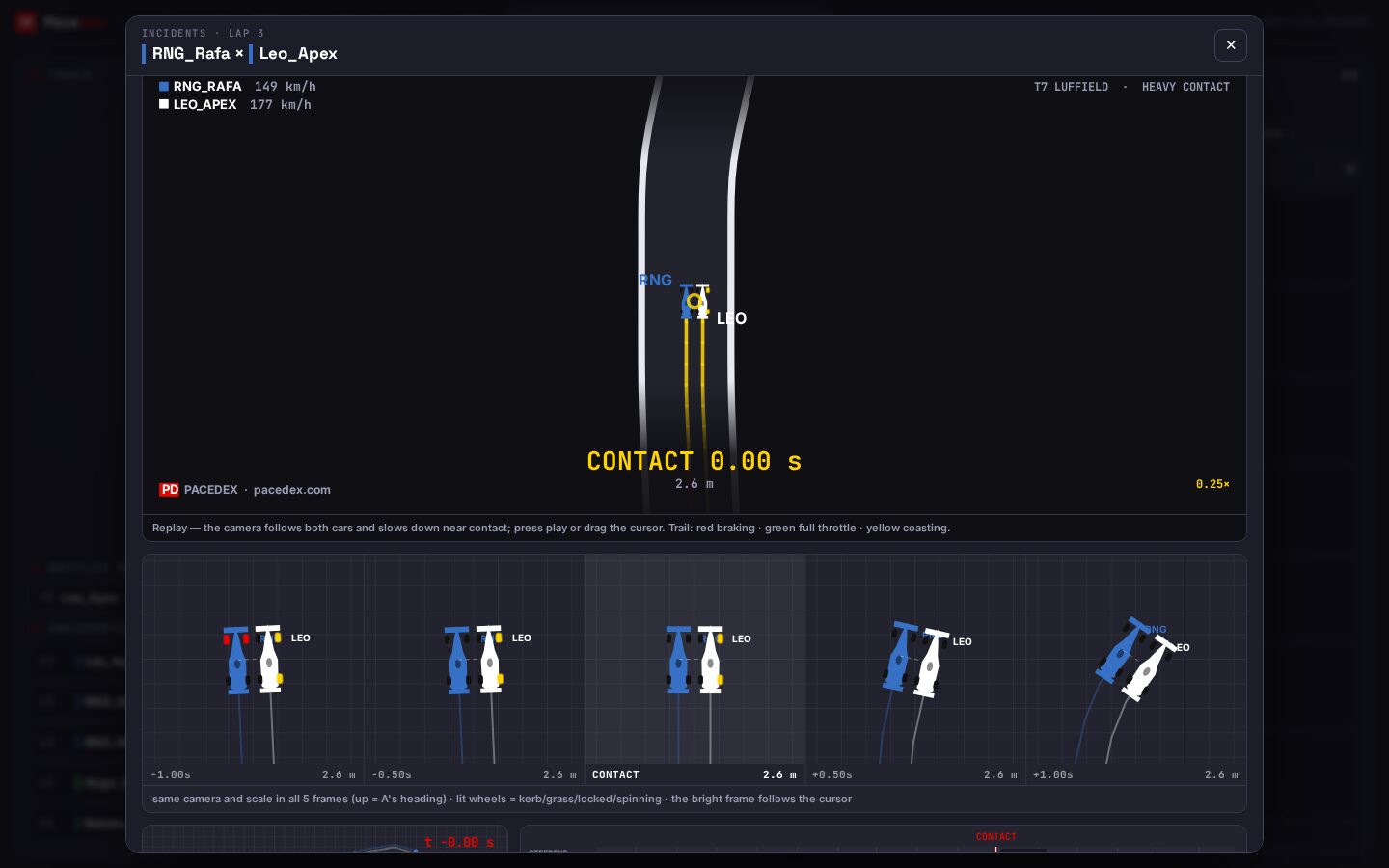 A contact opened from Race Control, with the race still running
Stewards who aren't at the game PC
The PC running Pacedex
When Pacedex is in a room — the lobby's automatic league room, on by default, or a Pit Wall you opened — Race Control shows a Remote stewards link at the top.
The other stewards
They open pacedex.com/race-control/<code> in a browser and see the same screen live: map, feed, battles, the table by driver and the incident list.
The incident detail
The list travels with the room; the ~12 s of both cars leaves the driver's PC only when a steward opens that contact. The Commentary Booth gets the same list, so the commentator can open it as well.
The league kit
Steward mode
Both drivers' telemetry in every incident and Race Control live, from one person running Pacedex in the lobby. Shareable incident link.
Broadcast + Booth →
F1 TV–style overlay for OBS — animated tower, battles, pit stops, weather — and the commentator's booth, local or remote.
Pit Wall →
A friend sees your car live on their phone and talks on your radio, into your headset. No lobby slot, no VPN.
Frequently asked
Do both drivers need Pacedex?
No. The game broadcasts the telemetry of all 22 cars to whoever is listening in the lobby, so one person is enough — the steward as a spectator, or any driver. Everyone else installs nothing.
Why does it say “restricted telemetry” for one driver?
That driver has the game's UDP Telemetry option set to Restricted. The game then sends position and speed but zeros for steering and pedals — Pacedex flags it instead of showing empty inputs. Ask them to switch to Public.
Can stewards follow the race without the game?
Yes. When the PC running Pacedex is in a room (the lobby's automatic league room is on by default), Race Control shows a link — pacedex.com/race-control/<code> — that opens the same screen in any browser: map, feed, battles, the table by driver and the session's incidents. Nothing to install.
Does the collision have to involve my car?
No. Any contact the game reports between any two cars is captured — that is what makes it work for a spectating steward. Drivers who only want their own can switch to “only my contacts” in Settings.
Which games?
F1 24, F1 25 and the F1 25: 2026 Season Pack, on PC, through the game's official UDP telemetry.
What else does Pacedex do for leagues?
An F1 TV–style broadcast overlay for OBS, a commentary booth that directs it, and a team-radio page so a friend can be your race engineer. All free.
Steward your next race with facts
Free · Windows · no account. Live overlay, voice race engineer, corner-by-corner analysis and the steward mode for F1 24/25/26.



Prefer a direct download? Get the installer (.exe)