 Pace


Your league's spreadsheet, without the spreadsheet.
Schedule the rounds, race and confirm: points, pole, penalties and standings in the format your league already uses come from the game's telemetry, no typing results. One PC in the lobby runs Pacedex — a spectator will do — and drivers install nothing.
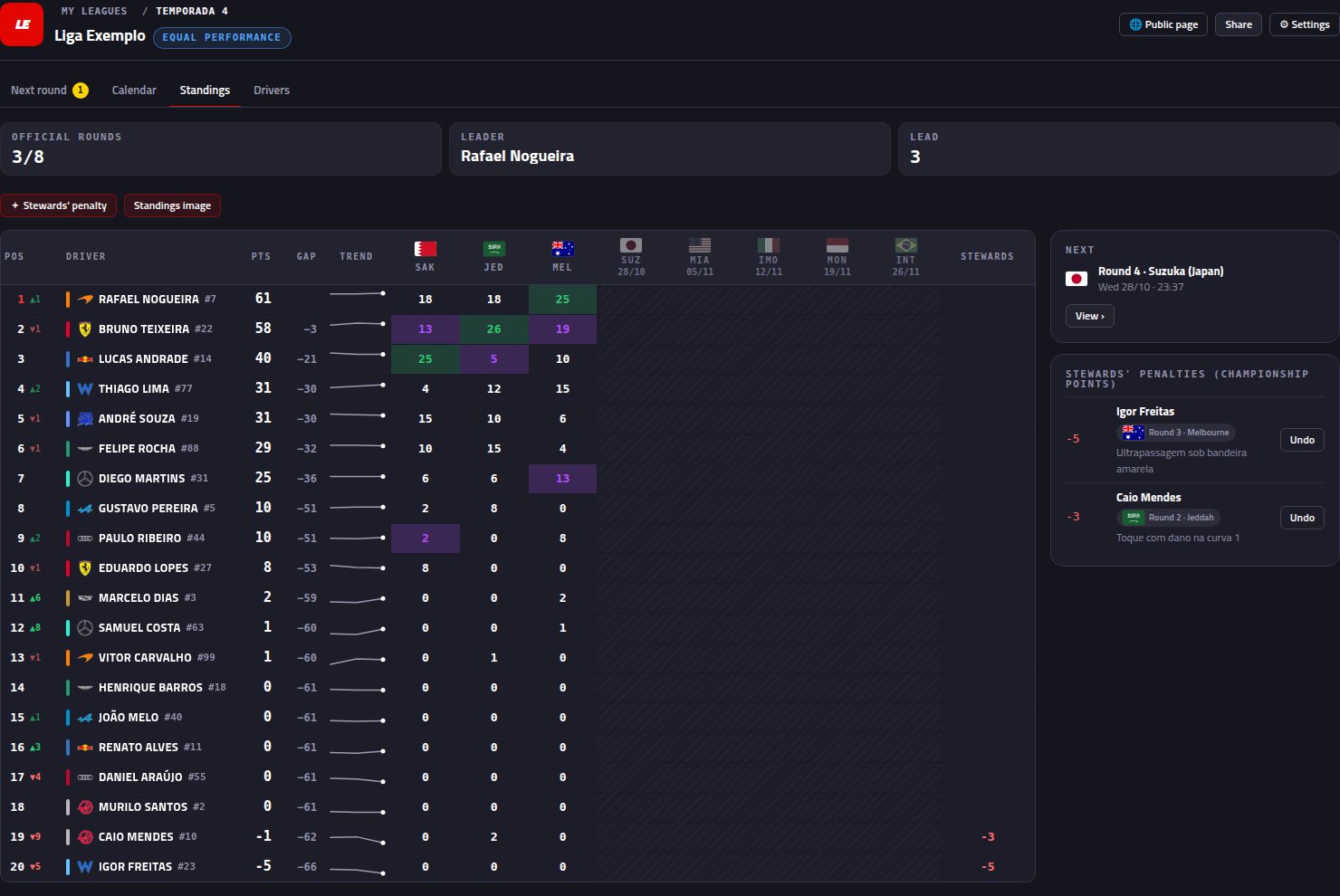 The real standings screen · fictional example league
A season in four steps
1 · Schedule
Track, date and time for each round, in the league's timezone. The league gets a public page with the calendar (it subscribes to phone calendars), attendance per round and a Discord reminder the day before.
2 · Race
The race on the round's track, from 1 h before to 4 h after the scheduled time, lands as that round's result by itself. Lobby crashed and was restarted? The most complete attempt wins.
3 · Confirm
The preview shows everyone's points before they count. “Who is it?” for drivers not on the list, game penalties adjusted (including giving back seconds served in the pits), pole and drag-to-reorder. Reopen whenever needed.
4 · Share
A standings image with a Copy button to paste in the group, ready-made text with the calendar, and the league's public page with standings, rounds and penalties.
Step by stepCreate your league and add a race that already happened →
Step by stepGot an invite? Join a league as a driver →
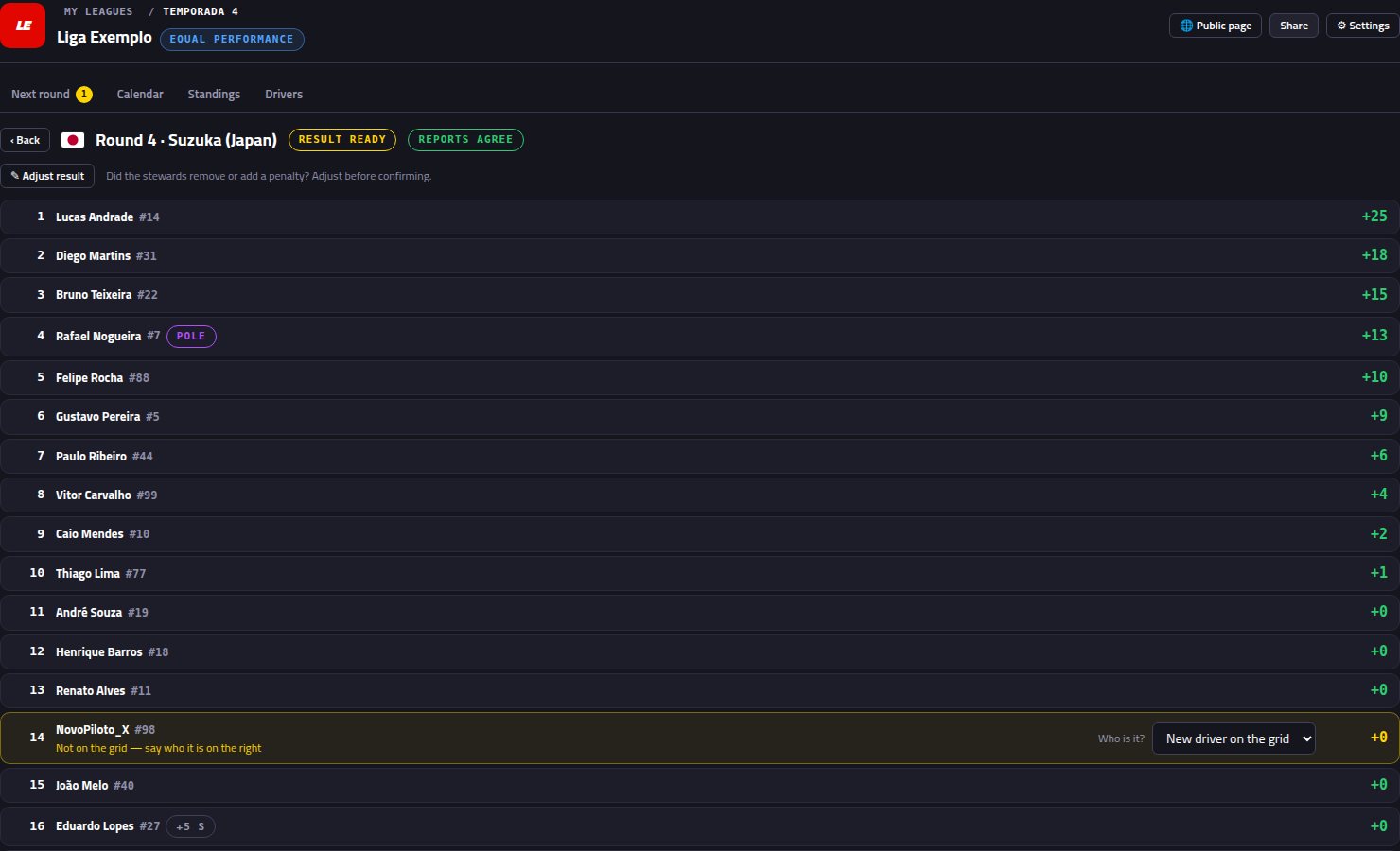 Before it counts: the round preview, with “Who is it?” and the reserve outside the points
The standings your league builds by hand
One column per round, green for the win, purple for pole and fastest lap that scored, DSQ and did-not-start marked — the spreadsheet format.
Upcoming rounds show in the standings with flag and date, so everyone sees where the season stands.
Position arrows since the previous round, a mini chart per driver and the championship trend chart.
Points taken after review, with the round and the reason, separate from the time penalty the game gave on track.
The final classification of any round — grid, laps, best lap, stops, time and points — without reopening anything.
With equal performance, each driver's fixed car shows in the standings with the team logo, the way leagues already do it.
Real league rules
Points table, pole and fastest lap editable at any time — every round is recalculated. Sprint with its own table, and dropping the worst rounds.
You decide whether reserves and guests score. Whoever doesn't score doesn't take a position: the next league driver gets the points — and the pole goes to the regular who started furthest ahead.
If a league driver changes gamertag, the app warns you and links the new one to the right entry; the points stay with them. A duplicated driver merges in one click.
Auto-confirm waits for the owner when an unknown driver shows up in the result. Everything the owner adjusts is recorded on the round.
The championship on the broadcast
In OBS, the Championship tower shows the whole league “as it stands”, lap by lap: position, who's climbing, the car, the points this race is paying and the total. Fixed next to the timing tower or rotating with the auto-direction. In the final round it becomes “title decider”, marks who can still be champion and adds the champion badge when the maths is done.
See the league broadcast →
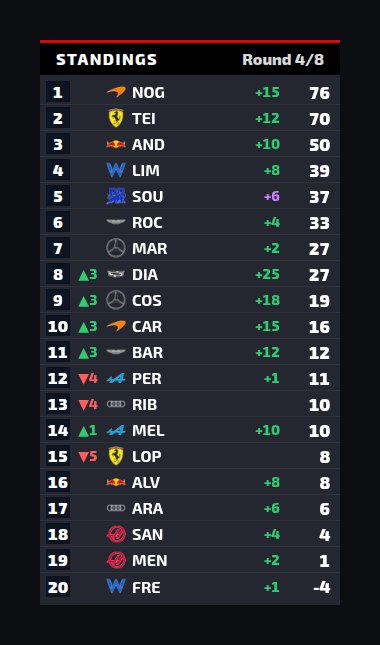
Leaving the spreadsheet
Paste the list your league already has (gamertag, name and number) into the Drivers list and pick who races in the league. Display name and photo go to the standings and to the broadcast.
“Cars from last lobby” fills each driver's car with the one they used in the most recent race.
Races this PC recorded before the league existed come in through “Link race from history”, filtered by the round's track and date.
The league kit
Championship
Calendar, points, penalties and spreadsheet-style standings, with a public page.
Broadcast + Booth →
F1 TV-style overlay for OBS, the championship tower and the commentator's booth.
Steward mode →
Both drivers' telemetry in every incident, with a link for the league.
Frequently asked
Do drivers need to install Pacedex?
No. The game sends the telemetry of all 22 cars to whoever is in the lobby, so one PC running Pacedex — a spectator will do — closes everyone's result. To create the league and its public page the owner signs in with an email, no password; drivers don't need an account.
Can I use it with rounds that already happened?
Yes. In the Calendar, “Link race from history” lists the races this PC recorded, filtered by the round's track and date. Pick the right one, check the preview and confirm.
The stewards removed a penalty. Now what?
In “Adjust result” you change each driver's time penalty — even negative, to give back time served in the pits — and the order is rebuilt from race time. You can also set the pole and drag the order. Round already confirmed? Reopen it and adjust.
What if a driver changes gamertag mid-season?
The app warns you when an unknown gamertag races with a league driver's number. One click links the new gamertag to their entry, and their points before and after stay together.
Do reserves and guests score?
You choose in the league Settings. Whoever doesn't score doesn't take a points position or the pole: the next league driver gets them.
Which games?
F1 24, F1 25 and F1 25: 2026 Season Pack, on PC, through the game's official UDP telemetry.
Bring the championship to your next round
Free · Windows. Championship, broadcast, commentary booth, steward mode and a voice race engineer for F1 24/25/26.
Download free · Windows →Looking for a league or drivers?
Leagues post open seats and invite codes in #🏆-leagues on our Discord. It's also where you ask anything and share setups.